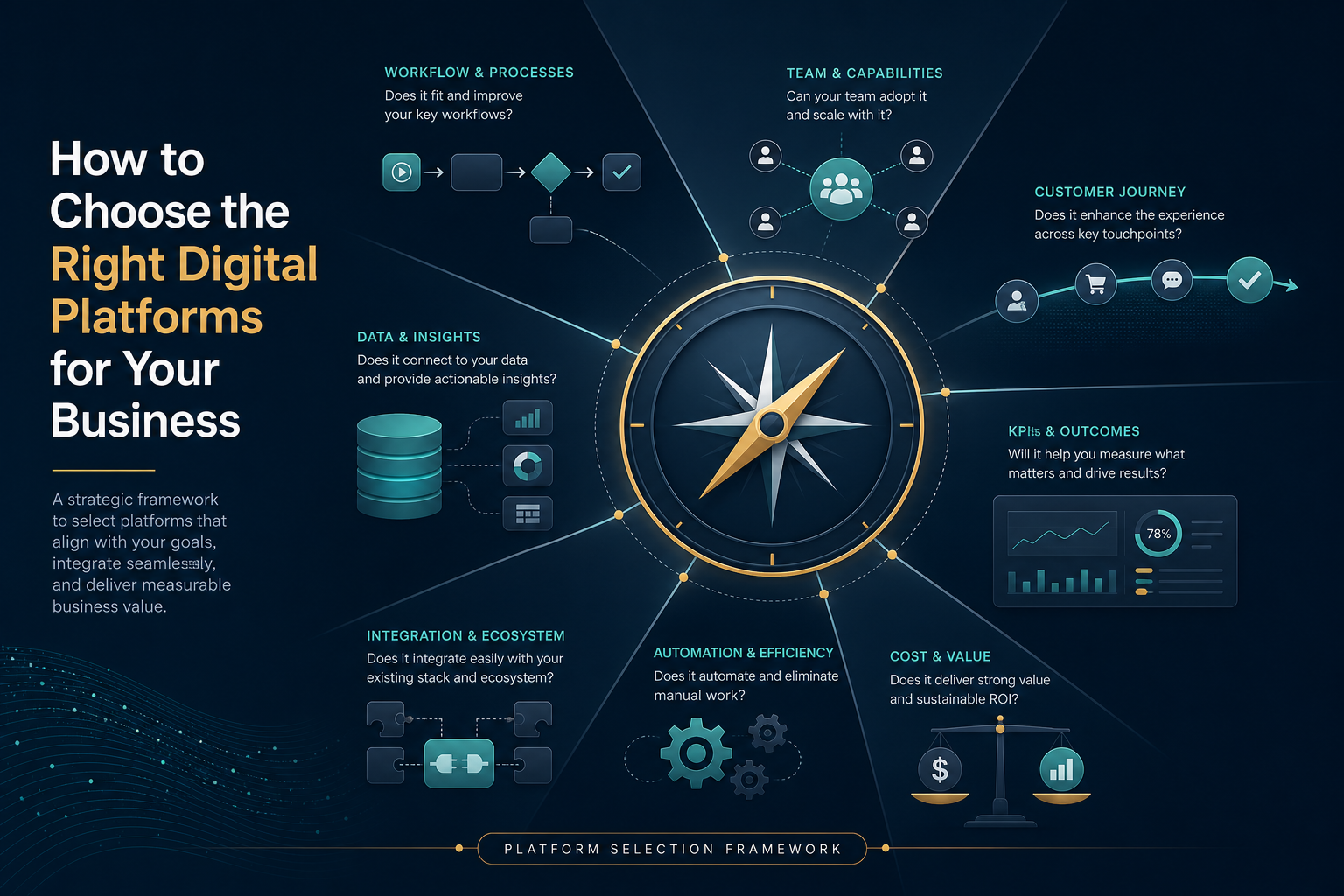
Selecting the right digital platforms is not about chasing the latest trends or copying your competitors. It is about matching tools to your actual workflows, team capabilities, and customer journey. Over 5 billion people spend an average of 2 hours and 20 minutes per day on social media, highlighting the vast potential audience available online. The question is not whether to use digital platforms, but which ones will actually move your business forward.
Table of Contents
ToggleKey Takeaways
The right platforms are those that fit your workflows, team, and customer journey—not just the most popular tools. A platform earns its place when your team uses it consistently and it delivers measurable results against your business goals. When evaluating options, it is essential to consider the cost implications of platform choices, as these can significantly impact your budget and overall profitability. A thorough analysis of each platform’s pricing structure will help uncover hidden expenses and long-term financial commitments. This attention to detail ensures that you select a solution that not only meets your operational needs but also aligns with your financial objectives.
Small businesses should start with 1–3 core platforms such as a website, CRM, and one ad or social media platform. Expand only when existing processes are stable and clearly delivering value.
Integration, automation, and reporting are as important as features and price when comparing platforms like Google Ads, LinkedIn Ads, and Instagram Ads. Data that flows cleanly between tools reduces manual work and improves decision-making.
The selection framework works like this: define business goals, map workflows, list integration needs, evaluate automation and reporting, then decide whether to keep, replace, or simplify. This article focuses on practical digital marketing and advertising platforms for small business owners.

What Digital Platforms Actually Do
Digital platforms refer to the concrete tools that enable businesses to execute, track, and optimize customer interactions online. These include website CMS options like WordPress or Squarespace, CRM systems such as HubSpot or Pipedrive, email marketing tools like Mailchimp or ActiveCampaign, social media platform managers including Hootsuite or Buffer, and ad platforms such as Google Ads, LinkedIn Ads, and Instagram Ads.
These platforms support the full customer journey in 2025–2026. Awareness comes through social media marketing and search engines where 68% of online experiences begin. Consideration happens via targeted landing pages and email nurturing sequences. Purchase is facilitated by integrated checkout systems, and loyalty is built through CRM-driven remarketing campaigns.
Core platform categories break down as follows:
Owned platforms: website, CRM, email list
Marketing execution platforms: social schedulers, ad managers
Data platforms: analytics like GA4, customer data platforms
Workflow and automation tools: Zapier, native platform automations
Video content is extremely important for social media engagement. A 2019 whitepaper by Cisco found that video traffic accounted for 75 percent of online time in 2017, rising to 82 percent by 2022.
Consider a local plumbing service using Google Ads to capture “emergency plumber near me” searches, generating 15-20 leads monthly. Those leads feed into a free HubSpot CRM for segmentation, which triggers automated email follow-ups. A platform’s real job is to make repeatable work easier, faster, and more visible—not to impress with advanced features.
Why Businesses Often Choose the Wrong Tools
Common mistakes include picking tools because competitors use them, chasing trends on every social media platform, or buying all-in-one suites they never fully use. A 2025 HubSpot survey found 42% of small businesses adopt tools like a rival’s Salesforce without assessing fit, resulting in 60% underutilization.
Specific pitfalls to avoid:
Choosing tools based on price alone without considering total cost of ownership
Focusing on social media popularity over business goals
Ignoring integration and data flow between platforms
Underestimating setup and training time requirements
A small e-commerce retailer in 2024 adopted Klaviyo’s full suite for $10,000 per year expecting AI personalization. The two-person team used only basic emails, leading to $15,000 in lost productivity and churn after six months.
“Feature FOMO” and vendor promises around AI, automation, and dashboards can distract from core needs like clear workflows and simple reporting. 86% of marketers say that social media has helped increase exposure, followed by increasing traffic at 73% and lead generation at 64%—but only when platforms align with actual business objectives. Without a clear objective, platform selection becomes reactive; with one, it becomes intentional. The wrong platforms create manual work, messy data, wasted effort, and poor visibility into ROI.
Platform Fit vs Feature Overload
Platform fit means the degree to which a tool aligns with your specific workflows, team skill levels, customer personas, and measurable goals. It is often measured by 70%+ weekly active usage of core features.
Here is how to contrast fit versus overload:
Fit: your team uses most core features weekly; tasks complete in under 5 clicks
Overload: most of the interface is unused or confusing; constant workarounds needed
Fit indicator: 30-day usage logs show 60%+ of features touched
Overload indicator: less than 20% feature utilization after onboarding
A small business running $5K monthly Google Ads campaigns finds perfect fit in Google Ads Editor’s lightweight interface for bulk edits taking 15 minutes. An enterprise platform like Marin Software has a 2-hour learning curve for the same task. A B2B firm choosing LinkedIn Ads over Instagram Ads because its buyer personas are decision-makers over 35 demonstrates smart platform fit.
Different types of content perform better on specific social media platforms. Visual-heavy content thrives on Instagram and Pinterest, while professional content is more suited for LinkedIn. Evaluate fit by testing with live campaigns, counting clicks to complete routine tasks, and interviewing users after 30 days. A smaller, focused tool that fits your workflow usually outperforms a huge platform that the team resists.
The Role of Workflows Before Software Selection
Teams should design their marketing and sales workflows on paper or whiteboard before touching any software. Software-forced changes fail 75% of the time according to the Standish Group’s 2025 CHAOS Report on digital transformations.
Key workflows to map include:
Lead generation from social media channels, Google Ads, or organic search
Lead capture through forms and landing pages
Nurturing via email sequences and retargeting
Sales handoff with CRM stage assignments
Weekly or monthly reporting on key metrics
Follow this practical mini-process:
Document current steps from first touch to closed deal
Identify bottlenecks like 48-hour lead response delays
Note who owns each step
List what data is needed at each point
Only then shortlist platforms to support the flow
For a service-based small business: a prospect finds the brand through a social media platform, clicks to a booking page, fills a form, receives email reminders, and gets added to a CRM for follow-ups. Software should fit into these workflows with minimal changes—mapped businesses see 2.5x faster adoption.

Questions to Ask Before Choosing a Platform
Structured questions reduce risk and help compare digital marketing, CRM, and advertising platforms objectively. Selecting the best digital platforms requires a strategic approach focused on aligning business goals with target audience behavior, content capabilities, and available resources.
Business-goal questions:
What specific outcomes are we targeting (e.g., 100 new leads per month from Google Ads)?
Which customer segments and specific audiences are we focusing on?
What timeframe do we have for seeing results?
Workflow questions:
Which tasks should this platform automate?
How will the team use it daily or weekly?
What manual steps must disappear for it to be worth the cost?
Data and reporting questions:
What metrics do we need (cost per lead, revenue per campaign)?
How often do we need reports and who needs to see them?
Can we track campaign performance across different platforms?
Adoption and support questions:
Who will own the tool internally?
What training is required and what support is available?
How easy is it to onboard a new hire?
Tools that offer measurable ROI, such as CRM, automation, or analytics platforms, should be prioritized over popular trends during evaluation.
Integration Requirements Across Your Stack
Integrations are the data plumbing enabling seamless flows between platforms like CRM, email marketing tools, Google Ads, LinkedIn Ads, and analytics. Choosing software that integrates with existing systems is important to avoid data silos and improve efficiency.
Common integration needs include:
Website forms pushing to CRM automatically
CRM tags triggering email platform sequences
Ad platforms exporting conversions to GA4 for attribution
Social media data aggregating in reporting dashboards
Data islands create serious risks: duplicate contacts inflating lists by 30%, inconsistent lead counts varying 20-40% across tools, and conflicting campaign results that confuse decision-makers.
Ask these critical questions:
Does this platform integrate natively with our CRM?
Is there a reliable API or connector via Zapier or Make?
Can it send key events like purchases back to ad platforms for better targeting?
Prioritize platforms that share clean data with minimal manual exports. This is especially crucial for small business owners with limited technical staff.
Automation Potential Without Losing Control
Automation should remove repetitive tasks like scheduling posts, sending follow-up emails, and updating lead stages—without hiding what is happening. Platforms leverage APIs and webhooks to automate data flows, reducing manual entry errors by 80%.
Valuable automations include:
Sending a welcome email after a form fill
Adding leads from Instagram Ads or Google Ads to a CRM list automatically
Notifying sales when a high-intent lead arrives via Slack
Pausing low-performing ads below 2% CTR automatically
Watch for risks of black-box automation: smart campaigns that spend budget on low-intent traffic, auto-posting tools that ignore audience behavior, or AI targeting misaligned with business goals. Performance Max can overspend 25% on low-intent traffic without clear visibility.
Evaluate automation features by checking for editable rules, clear logs of actions, and easy overrides. Start with low-risk automations like email drips, measure 20% efficiency gains, then scale. Automated responses should enhance, not replace, real time interaction with potential customers.
Reporting and Visibility for Smarter Decisions
Reporting is central because leaders need to see what works across social media marketing, search, and email to decide where to invest. Without clear data, marketing efforts become guesswork.
Key reports small businesses typically need:
Traffic and leads by source
Cost per lead from platforms like Google Ads and LinkedIn Ads
Revenue attribution by channel
Simple social media engagement summaries
Good reporting features include drag-and-drop filters, scheduled PDF exports, and clear dashboards that match CRM reality within 5% variance. Testing software through free trials or demos can help assess user-friendliness and functionality within your specific business context.
Example setup: pull ad spend and leads from Google Ads, Instagram Ads, and LinkedIn Ads into a single weekly summary. This revealed for one business that Instagram’s $15 CPA had only 10% close rate versus LinkedIn’s $80 CPA with 30% close rate. Report assembly time dropped from 8 hours to 1 hour, and unprofitable spend was cut 30%. The right platform reduces time spent assembling reports and improves budget decisions.
Cost vs Operational Value
Cost must be weighed against time saved, errors reduced, and revenue increased by each platform. Calculating total expenses, including setup and training, is essential when assessing the total cost of software tools.
Direct costs to consider:
Subscription fees ($29 Mailchimp vs $99 ActiveCampaign monthly)
Per-user charges ($15/seat HubSpot)
Implementation fees ($500-5K for agencies)
Paid add-ons for integrations or advanced reporting
Indirect costs matter too:
Training time (20 hours × $50/hr = $1K)
Maintaining manual workarounds (5 hours/week × $75 = $1.5K/month)
Campaign mistakes due to confusing interfaces
Simple evaluation method: estimate hours saved per month, multiply by internal hourly rates, and compare against platform cost. Assessing resources and budget is essential when evaluating digital tools, including whether there is budget for paid advertising or time for organic engagement. Start with a lean stack and upgrade only when a clear business case exists.
When to Keep, Replace, or Simplify a Platform
Every 6–12 months, review whether each platform still earns its place in your stack. It is crucial to assess the scalability and flexibility of tools, ensuring they can grow with the organization and handle increased complexity.
Signs you should keep a platform:
80%+ team adoption
Clear time savings of 20%+ on key tasks
Good integrations humming smoothly
Measurable impact on business goals
Signs you should replace it:
Constant workarounds needed (more than 5 per week)
Poor support with under 90% ticket resolution
Missing critical integrations
Declining results even after optimization
Signs you should simplify:
Overlapping tools (multiple social media tools, multiple CRMs)
Complex stacks for simple needs
One platform can realistically absorb another’s job
Test a new tool alongside the old one for 30–60 days, migrate slowly, and document new workflows. Key steps in tool evaluation include running trials, assessing vendor support, and prioritizing security.
Final Framework for Platform Selection
This is a clear, repeatable checklist for whenever you consider a new platform. Effective strategies for selecting digital platforms include defining clear, measurable objectives, mapping platforms to audience spend, and starting with 1–2 platforms for maximum ROI before expanding.
Step-by-step framework:
Define business goals and metrics (50 leads at $40 CPA)
Map customer journeys from awareness through loyalty
Document workflows before selecting tools
List integration, automation, and reporting needs
Shortlist 3 candidate platforms (G2 rating 4.5+ stars)
Run 30-day trials with $100 test budgets
Decide based on actual usage data
Core foundations to start with: a solid website, analytics (GA4), a simple CRM, one primary social media platform where your audience prefers to engage, and one primary ad channel like Google Ads or Meta Ads.
The 70/20/10 Rule suggests structuring content so that 70% builds brand value, 20% is shared content, and 10% is promotional. Add channel-specific tools like LinkedIn Ads managers or social schedulers only when the base workflow is working reliably. A structured approach to platform selection, grounded in data, audience insights, and clear objectives, transforms social media from a reactive activity into a reliable driver of growth.
Quick Comparison of Common Digital Marketing Platforms
Technique | Intensity | Risk | Best For |
|---|---|---|---|
Search Ads (Google Ads) | High effort | Medium budget risk | Intent-driven services, local businesses, $40-60 CPA |
Social Media Ads (Instagram/LinkedIn) | Medium-high effort | Higher budget risk | Visual B2C storytelling, B2B lead generation |
Email Marketing | Medium effort | Low risk | Nurturing, loyalty, 3x LTV improvement |
Organic Social Media | Low-medium effort | Low risk | Brand awareness, community building |
CRM Workflows | Low effort post-setup | Low risk | Customer relationships, retention |
Mix low-risk techniques like email and CRM with higher-intensity approaches like paid ads based on your budget and skill level. YouTube is the second most visited website globally, with 2.5 billion monthly active users, providing a significant opportunity for businesses to engage with potential customers through video content. Analyzing competitors can provide insights into which platforms are successful for your specific industry.

Best Platforms and Approaches for Beginners
For beginners and small business owners choosing their first digital marketing tools, simplicity wins. A recommended strategy is to start small on one or two platforms, utilizing free trials and small test campaigns to analyze results before committing resources.
Recommended starter stack:
Website with basic analytics (Squarespace $16/month + GA4 free)
Lightweight CRM (Pipedrive $14/user)
One primary social media platform where your target audience is active
One ad channel (Google Ads with $500 test budget)
How to choose your first social media platform:
Instagram for visual B2C brands targeting younger audience (25-34 year olds)
LinkedIn for B2B professional services and industry leaders
Facebook for broad local reach with over 3 billion monthly active users
Facebook has over 3 billion monthly active users, making it the largest social media platform, which is beneficial for increasing brand awareness and customer engagement. Instagram is particularly effective for visual content, with 50% of users having purchased a product or service after seeing it in Instagram Stories, highlighting the platform’s strength in visual storytelling.
It is important to research where the target audience, defined by age, location, and interests, is most active on digital platforms. Start with manual actions first—posting, simple marketing campaigns—before layering in automation. Run a 90-day test on one platform, measure leads and sales, and only then decide whether to add another. To effectively reach your right audience, analyze which platforms they prefer, as audience behavior should guide platform selection rather than assumptions.
Advanced and Intense Platform Combinations
This section targets teams with some experience who want more advanced, higher-intensity setups to drive website traffic and generate leads at scale.
Concrete combinations that work:
Google Ads + retargeting + CRM-based email automation for service businesses
LinkedIn Ads + account-based marketing workflows for B2B targeting specific audiences
Instagram Ads + Shopify + email flows for ecommerce with visual storytelling
LinkedIn is ideal for B2B lead generation, while Instagram is better for visual B2C brand storytelling. LinkedIn generates the highest visitor-to-lead conversion rate of any social network at 2.74 percent, which is three times higher than Twitter and Facebook, making it particularly effective for B2B marketing.
These combinations require stronger skills in tracking, creative testing, and attribution. They carry higher budget and operational risk. Stage complexity carefully: add advanced techniques only after basic dashboards, conversion tracking, and workflows are in place.
LinkedIn users include decision-makers and industry leaders, making it powerful for professional services. Evaluate whether you have internal skill and time or should bring in external specialists before going all in on complex stacks. Platforms should be selected based on the capability to create specific types of content; avoid platforms that do not align with available content creation resources.
Safety, Compliance, and Data Protection When Using Platforms
Safety and compliance matter in 2025–2026 due to privacy regulations like GDPR and CCPA, ad policies, and data security risks. Defining specific social media goals is crucial as it helps determine not only the social platform to choose but also the content to create and the audience to target.
Key safety practices:
Use strong access controls and limit admin roles
Enable two-factor authentication on all platforms
Revoke access immediately when staff or agencies leave
Review ad formats and content against platform policies
Data and privacy requirements:
Maintain a clear privacy policy on your business page
Configure cookie consent on websites using tracking pixels
Respect unsubscribe rules in email tools
Evaluating vendor support is necessary to ensure adequate training and support is provided
Review each platform’s data processing and storage policies, especially when connecting CRMs, ad managers, and third-party automation tools. Schedule annual audits to review who has access and whether all connections serve a valid business need. This protects loyal customers and your company culture.
Psychological and Operational Effects of Platform Choices
Platform choices affect team stress, focus, and trust in data as much as they affect marketing results. Too many tools can overwhelm small teams, fragment focus, and lead to dashboard fatigue where nobody believes any single report.
Positive effects of a well-chosen, lean stack:
Clearer ownership of each platform and workflow
Faster execution with less context-switching
More confidence in reported numbers
Better operational efficiency across the team
Listen to user feedback actively. If the team avoids a tool, constantly exports data manually, or complains about confusion, the right platform may not be in use. Behind the scenes content about how teams actually work with tools reveals more than vendor demos.
Schedule regular retrospectives every quarter. Ask what feels heavy, what feels helpful, and what can be simplified. Build brand awareness while maintaining team sanity by choosing platforms that support both customer relationships and internal workflows.
FAQ
How many digital platforms should a small business use at the start?
Most small businesses should begin with 3–5 core platforms: a website or CMS, analytics, a simple CRM, one main social media platform, and one main ad channel like Google Ads or Meta Ads. This range keeps operations manageable while covering the full customer journey from discovery to follow-up. Add new platforms only when existing ones are stable, consistently used, and clearly delivering value. Facebook groups, company page management, and youtube videos can come later as capacity grows.
Should I focus on social media marketing or search ads first?
The choice depends on business goals and target audience. Search ads via Google Ads work well for capturing active demand from people already searching for solutions. Social media marketing through social media networks builds awareness, community, and engagement with potential customers over time. Recommend search ads first for local services and high-intent offerings. Choose social media first for visually driven or impulse-purchase products. Test both at small budgets if possible, then shift spend to whichever channel produces better cost per qualified lead.
How do I know if a platform’s analytics are accurate enough to trust?
No analytics system is perfect, but numbers should be directionally consistent across tools. Leads in your CRM should roughly match form submissions reported in your ad platforms. Conduct regular spot checks: compare tracked conversions with real orders or inquiries during a specific week. Fix obvious gaps like missing tracking codes or broken pixels before making big budget decisions. Online reviews of platforms often reveal common accuracy issues.
When is it worth upgrading to a more advanced marketing or CRM platform?
An upgrade makes sense when the current platform clearly blocks growth. Common signs include limits on contacts, missing automations that would save hours weekly, or reporting that cannot answer key questions about campaign performance. Document exact limitations for 1–2 months so the upgrade has a clear business case. Pilot the new platform in parallel with a small team before migrating fully. Short form videos and more sophisticated ad formats become possible with advanced tools.
Do I need different platforms for B2B vs B2C marketing?
Many core tools like website, analytics, CRM, and email work for both B2B and B2C. Channel emphasis differs significantly. B2B firms may prioritize LinkedIn Ads, email nurturing sequences, and CRM workflows tied to account-based sales. They benefit from a strong linkedin presence and targeting ideal customers through business interactions. B2C brands typically lean on Instagram Ads, social media marketing emphasizing visual storytelling, and ecommerce integrations. Choose platforms based on how your specific buyers research and decide, considering their audience interests and where they post consistently.